
Aaluman
Circle Crop Tool
⚪ Circle Crop Tool
Create perfect circular images – ideal for profile pictures, logos, and badges. Adjust zoom and position. One‑click crop & download. Private, fast, browser‑based.
Drag & drop or click to select image (JPG, PNG, WebP, etc.)
📖 About the Circle Crop Tool
The Circle Crop Tool is the easiest way to turn any image into a perfect circle. Whether you need a profile picture for social media, a round logo for your brand, or a circular badge for a certificate, this tool gives you complete control. You can upload any image (JPG, PNG, WebP, etc.), zoom in/out, and drag to position exactly what you want inside the circle. The live preview shows the final result instantly, and the output is always a high‑quality PNG with transparency. All processing happens locally in your browser – your images never leave your device, ensuring privacy and security.
Key Features:
- Drag & Drop Upload: Simply drag an image into the upload area – no complicated forms.
- Zoom In / Out: Use the slider to zoom into the image for precise composition.
- Drag to Position: Click and drag the image inside the circle to centre your subject.
- Live Preview: See the resulting circle in real time as you adjust.
- One‑Click Crop & Download: The dedicated button instantly crops and saves your circle image as a high‑quality transparent PNG.
- Privacy First: All editing happens locally – no uploads, no servers.
📋 Step by Step Guide
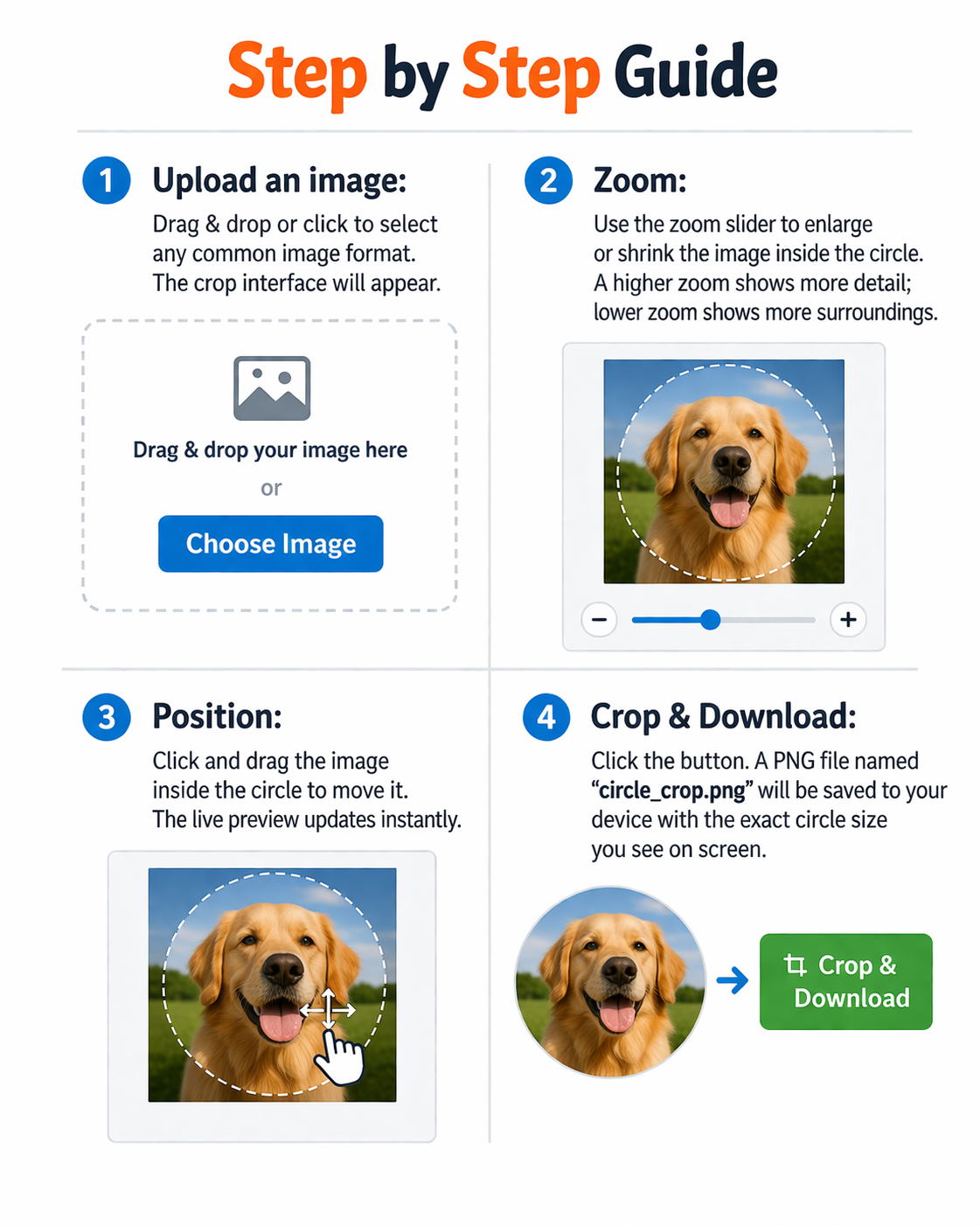
- Upload an image: Drag & drop or click to select any common image format. The crop interface will appear.
- Zoom: Use the zoom slider to enlarge or shrink the image inside the circle. A higher zoom shows more detail; lower zoom shows more surroundings.
- Position: Click and drag the image inside the circle to move it. The live preview updates instantly.
- Crop & Download: Click the “Crop & Download Circle” button. A PNG file named “circle_crop.png” will be saved to your device with the exact circle size you see on screen.
Pro Tip: For profile pictures, zoom in tightly on the face. For logos, zoom out to include the entire design. The resulting image will be a perfect circle with a transparent background, ready to use anywhere.
💡 Real Life Examples & Use Cases

Social Media Profile Pictures: Sarah needs a new profile picture for LinkedIn, Twitter, and Instagram. She uploads a high‑resolution photo, zooms in on her face, and drags to centre it. She clicks download – the result is a perfectly round, professional image that looks great on all platforms.
Logo Creation: A small business owner wants a circular logo for their website and business cards. They upload their square logo, zoom out to fit the entire design inside the circle, and download a transparent PNG with a modern, polished look.
Badges and Awards: A teacher creates digital certificates for students. She uploads a star icon, zooms to frame it perfectly, and downloads a crisp PNG that overlays beautifully on the certificate.
Product Photography: An online store owner needs circular product images for a gallery. He uploads product photos, crops them into circles with consistent zoom, and downloads them for a stylish, uniform gallery.
Email Signatures: A freelancer adds a circular headshot to their email signature. Using the tool, they crop a photo and embed the image – the email loads fast and looks professional.
📰 The Art of Circular Cropping
Circular cropping is more than just a visual trend – it’s a powerful design tool. Human eyes are naturally drawn to circles, making them perfect for highlighting important elements like faces, logos, or key objects. In this article, we explore why circles are so effective and how you can master the art of circle cropping.

Why Circles Work
Circles are soft, friendly, and focus attention. When you see a circle, your gaze naturally moves to its centre. This makes circular images ideal for profile pictures, where you want people to connect with the subject, and for logos, where you want the brand mark to stand out. Circles also work well in UI design – think of app icons, avatar placeholders, and call‑to‑action buttons.
Techniques for Perfect Circle Crops
- Zoom to fill: For a headshot, zoom in so the face fills most of the circle. This creates an intimate, engaging look.
- Zoom out for context: For a product or a landscape, zoom out to include more surroundings, creating a vignette effect.
- Use transparency: A transparent PNG allows you to place the circle on any background without a white box.
Where to Use Circle Crops
- Social media profiles: LinkedIn, Twitter, Instagram – all use circular avatars.
- Website avatars: User comments, author bios, team pages.
- Logos and badges: Circular logos are versatile and modern.
- Product icons: e‑commerce thumbnails, app icons.
- Digital certificates: Add a circular stamp or seal.
With our Circle Crop Tool, you can achieve all of this in seconds. No design skills required – just upload, adjust, and download. The tool handles transparency automatically, so your circles look clean and professional.

Start creating your perfect circles today – it’s free, private, and runs entirely in your browser.